|
INV-014Cordell Studio
|
|
PAYMENT DUE 1 SEP 2026ada@cordellstudio.com
|
|
Invoice
INV-014 · NET 14
Cordell Studio
14 Fenwick Row
Bristol BS1 4QR ada@cordellstudio.com GB 418 2277 05
Description
Qty × Rate
Amount
Brand identity, second round
1 × 2,400.00
£2,400.00
Website design, five pages
1 × 1,800.00
£1,800.00
Photography art direction
2 × 225.00
£450.00
Balance due · GBP
£5,580.00
Subtotal £4,650.00 · Tax £930.00
|
Free · Works offline
Invoices,
Invoices,
quietly.
Write, send and track invoices from your browser. Free, with every feature on. Your work stays on your machine unless you turn sync on.
This one is real · Type into it
Every competitor shows you a dashboard. The thing your client receives is a document.
The invoice above is not a picture of one. It is rendered by the same code that prints yours, from the same file, so it cannot quietly drift out of date.
The application
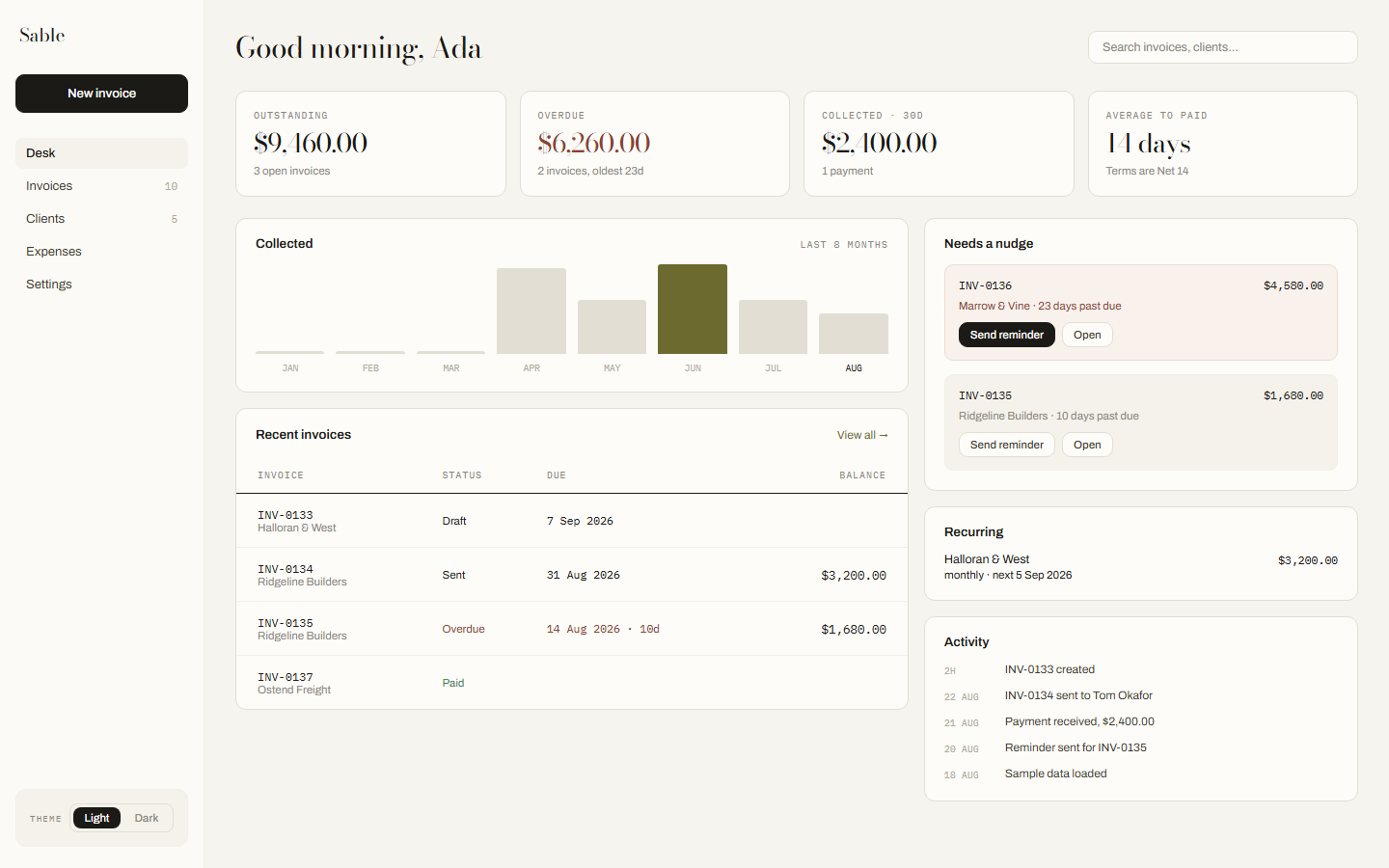
Everything owed, everything late, and what happened lately. One screen you can open and close in ten seconds.
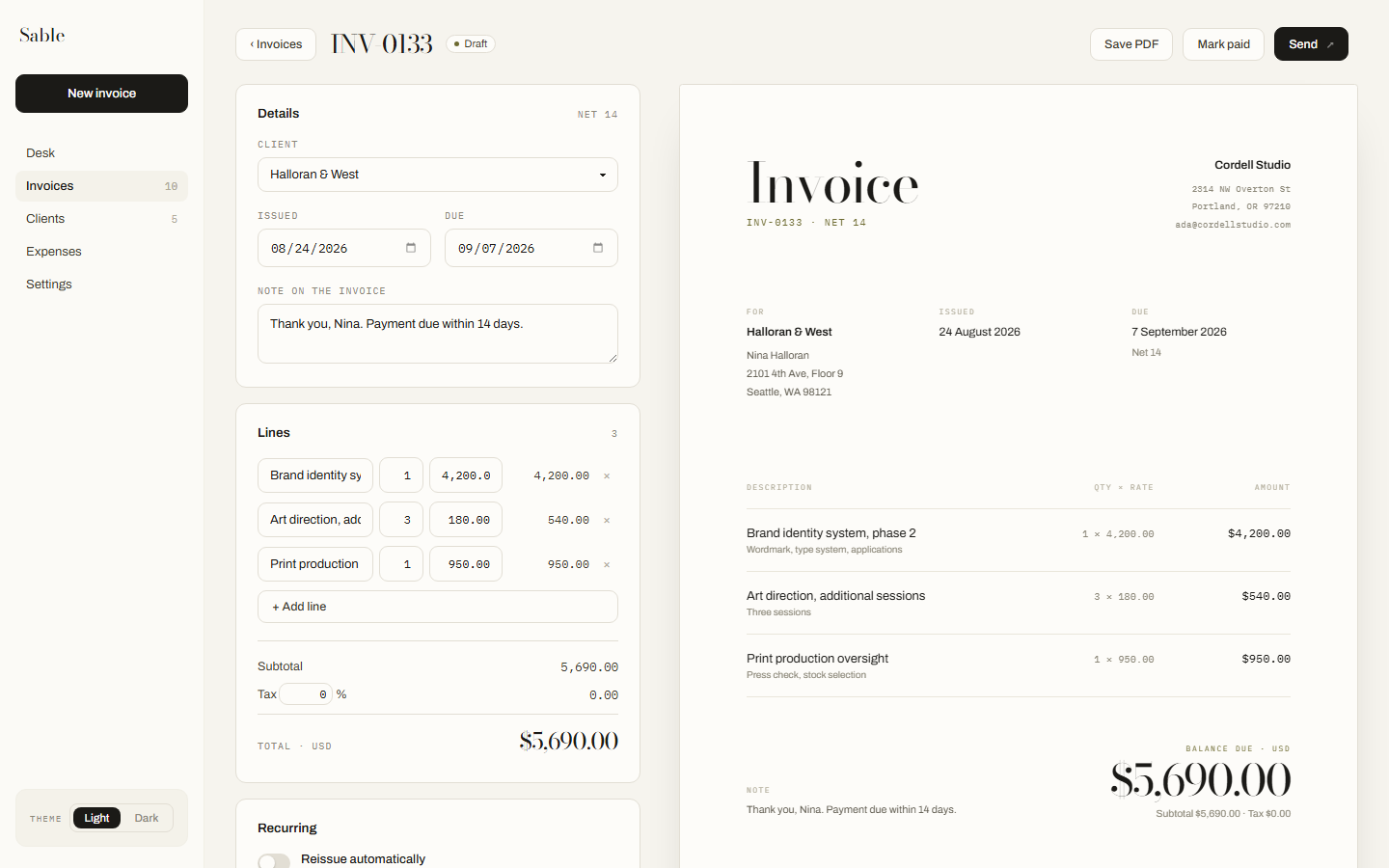
The form on the left, the finished document on the right, updating as you type. What you see is what prints.
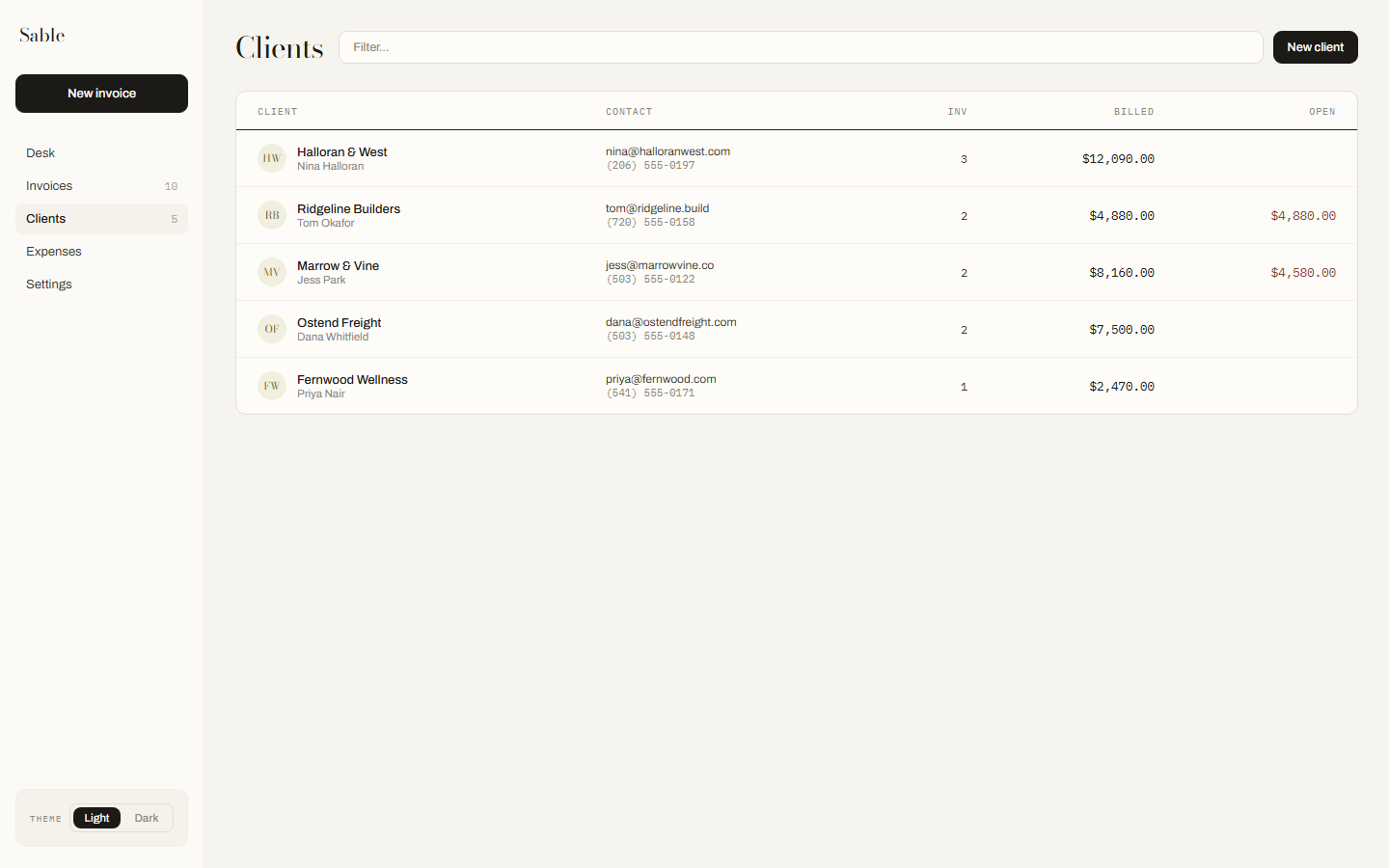
Saved once, filled in from then on. Who owes what, and how long they usually take.
What it does
01
Writes the document
Line items, tax, your logo, your terms. It prints to PDF from the browser, on Letter or A4, and looks like it came from a studio rather than a spreadsheet.
02
Tracks who has not paid
Sent, due, overdue and paid, with the total owed at the top of the desk. Invoices that repeat every month issue themselves.
03
Keeps your clients and costs
A client saved once fills itself in next time. Expenses sit beside the income, so the month is one number rather than two files.
04
Follows you between machines
Sign in and the same records reach the website and the Chrome extension. Nothing to import and nothing to keep in step by hand.
Against a spreadsheet
| When | A spreadsheet | Sable |
|---|---|---|
| A client pays late | You find out when you next open the file | The overdue count is on the desk, and on the toolbar |
| The same invoice again next month | Duplicate it, change the date, renumber it, hope | It issues itself on the day |
| You switch to another machine | Email the file to yourself and mind the versions | Sign in |
| What the client actually receives | A spreadsheet, or a PDF that looks like one | A document set like a letterhead |
| Two businesses, one person | Two files, two conventions, one numbering mistake | Two accounts that never touch |
| Getting your records out | It is already a file. Nothing to get out | JSON or CSV whenever you like |
The last row is the one a spreadsheet wins, and it is worth saying so. Sable exports to JSON and CSV precisely because leaving should never cost you anything.
Planned pricing
Sable is free today, with every feature on and no limit on invoices. These are the plans it will move to when paid accounts open. Nothing is charged, nothing here can be bought yet, and anyone already using Sable keeps what they have.
Desk
$0forever
Three invoices a month. Enough to prove it works on your own money.
- Three invoices a month, no watermark
- Unlimited clients, PDF export
- No recurring, reminders or expenses
Studio
$12a month
For anyone who invoices every month. Pays for itself the first time an invoice gets paid on time.
- Unlimited invoices
- Recurring and overdue reminders
- Expenses and profit summary
- Payment block, CSV and JSON export
Practice
$29a month
For studios and trades keeping more than one set of books.
- Everything in Studio
- Multiple business profiles
- Templates, quotes and deposits
- Encrypted backup, restore anywhere
Yearly billing is planned at $10 a month for Studio, two months free. Early accounts keep whatever rate they joined on.
Your client list is nobody else's business.
An invoice names the person who hired you and what you charged them. That is not something to hand over lightly, so Sable is built to need as little of it as possible.
Read the whole privacy policy. It is the same document the app itself shows.
- Works with no connectionAlways
- Analytics or trackersNone
- Third-party scriptsNone
- Uploaded before you sign inNothing
- Export your recordsAny time
- CostFree
Asked often
Do I need an account?
On the website, yes. Signing in is what keeps a copy of your work off this one machine, and browser storage on a website can be cleared by the browser itself. The Chrome extension runs without an account at all.
Where are my invoices kept?
In your own browser, first and always. Sable reads and writes locally, which is why it works with no connection. Signing in adds a second copy under your account so the same records reach your other machines.
What does it cost?
Nothing. Every feature is on, there is no plan to buy, and no payment details are collected anywhere in the product.
Can I take my records with me?
At any moment, without asking. Settings exports every invoice, client and expense as JSON or CSV, and the export is a complete copy rather than a summary.
Does it do tax?
It applies a rate you set and shows it on the document. It is not an accountant and does not file anything for you, and what your invoice must say is your responsibility.
What happens if Sable disappears?
The extension and the website keep working on your own machine, because that is where your records already are. Export them whenever you like.
Write one and see.
It opens in the browser. Nothing to install, and nothing to fill in before you start.
Create an invoice